
NOTE
2.9 Kafka Topic
Kafka Topic, Partition, Offset, Replication, ISR/OSR, replica assignment, reassignment, and preferred replicas.
This is a historical learning note and may contain outdated or incomplete understanding.
1. Topic
- Messages in Kafka are categorized by Topic; a Topic is a logical concept.
- Kafka has two internal Topics.
__consumer_offsetsis used to store consumer offsets.__transcation_stateis used to persist transaction state information.
2. Partition
- A Topic is divided into multiple Partitions.
2.1. Why Have Partitions?
Distributed System Partitioning
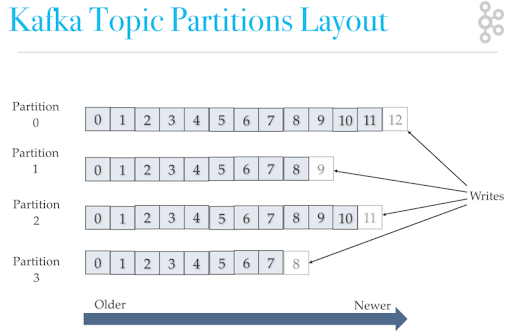
2.2. Ordering of a Partition
- Kafka cannot guarantee ordering for an entire Topic.
- A Partition is ordered.
- Write: each time a message is added to a Partition, it is appended to the end.
- Read: a Partition can only be consumed by one consumer in the same consumer group, which preserves ordering.
3. Offset
- Each message has a corresponding offset that indicates its position.
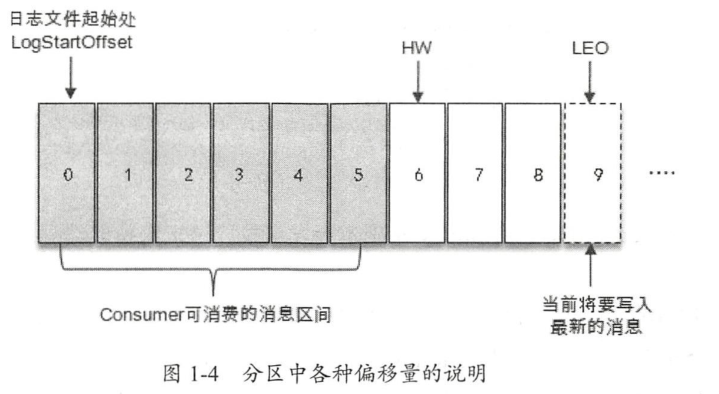
- LEO: Log End Offset. The offset of the last message in the current replication + 1 = the next position where the producer writes a message.
- HW: High Watermark. The smallest LEO in the ISR set, that is,
min(LEO of the ISR set). Consumers can only pull messages before this offset. - LW: Low Watermark. The smallest LEO in the AR set.
- LSO:
- for an unfinished transaction, LSO equals the position of the first message in the transaction;
- for a completed transaction, LSO equals HW.
4. Replication
A Partition can have multiple Replications; this is the multi-replica mechanism.
4.1. Why Have Replication?
Distributed System Replication
4.2. Leader and Follower
- Among all replicas of a Partition, one is called the Leader and the others are called Followers.
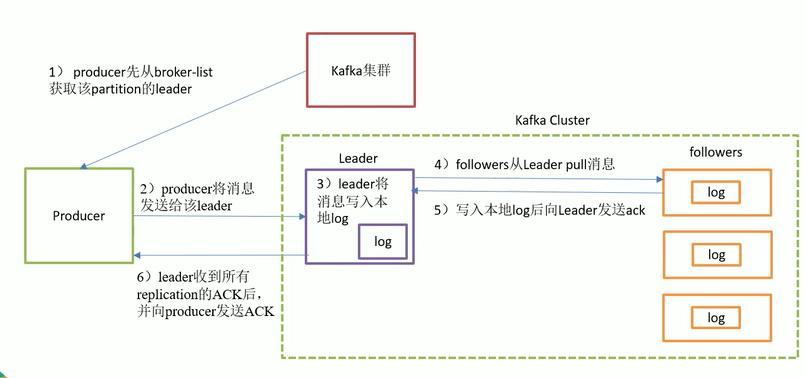
- Messages we send are sent to the Leader replica, and Follower replicas then pull messages from the Leader replica to synchronize.
4.2.1. Leader Election
4.2.1.1. When Leader Election Occurs
- When a partition is created or comes online:
- find the first live replica in the order of the AR set, and that replica must be in the ISR set;
- if there is no available replica in the ISR, check the
unclean.leader.election.enableparameter. If it is true, the first live replica in the AR list becomes leader.
- When a partition is reassigned:
- find the first live replica in the reassigned AR list, and that replica must be in the current ISR list.
- When a node is gracefully shut down:
- find the first live replica in the AR list.
4.2.1.2. Leader Election Process
- The Leader is elected by the Controller.
4.2.2. How Leader and Follower Synchronize Data
- The producer client sends a message to the Leader.
- The message is appended to the local log of the Leader replica, and the log offset is updated.
- The Follower replica requests synchronized data from the Leader replica.
- The server hosting the leader replica reads the local log and updates the information for the corresponding follower replica making the fetch request.
- The server hosting the leader replica returns the fetch result to the follower replica.
- After receiving the fetch result returned by the leader replica, the follower replica appends the message to its local log and updates the log offset information.
4.3. AR = ISR + OSR
- AR: all Replications of a Partition.
- ISR: all Replications that stay synchronized with the Leader.
- OSR: Replications whose synchronization with the Leader lags too far behind.
- AR = ISR + OSR. The ISR is maintained by the Leader. Follower synchronization from the Leader has some delay. If the delay exceeds the threshold, the replica is removed from the ISR and placed into the OSR. Newly added Followers are also placed into the OSR.
4.3.1. When a Replica Is Put into OSR
- A newly started Follower is placed into the OSR.
- ISR -> OSR
lastCaughtUpTimeMs: when a follower replica has synchronized all logs before the leader replica’s LEO, the follower is considered to have caught up with the leader replica. At this point, the replica’slastCaughtUpTimeMsmarker is updated.- Kafka starts a scheduled task to check whether the difference between the current time and the replica’s
lastCaughtUpTimeMsis greater than the value specified byreplica.lag.time.max.ms.
4.4. How Replication Is Assigned to Brokers
- A Topic is a logical concept, but replication is a physical concept. There are multiple Brokers in a cluster, so where should the replicas be placed?
- Rules
- Assignment of the first replica, or leader partition:
- the first replica of the first partition is assigned randomly, and the first replicas of the other partitions move forward in sequence.
- Assignment of other replicas, or follower partitions:
- the displacement relative to the first replica is
nextReplicaShift, which is random.
- the displacement relative to the first replica is
- Assignment of the first replica, or leader partition:
- Example
- Suppose there are 3 brokers, the partition parameter is 3, and the replica parameter is 2.
- Then leader1 is randomly placed on one broker, such as broker2. The following leaders are placed in round-robin order: leader2 on broker3 and leader3 on broker1.
- follower1 is assigned by adding an offset to leader1, for example broker3. The following followers use the same offset: follower2 on broker1 and follower3 on broker2.
4.4.1. Partition Reassignment
4.4.1.1. Why Have Partition Reassignment?
When Brokers are added or removed, only partitions belonging to newly created Topics are assigned across those Brokers; previously created ones are not. Partition reassignment handles the partitions of previously created Topics.
4.4.1.2. How to Reassign Partitions
kafka-reassign-partitions.sh
4.4.1.3. Principle of Partition Reassignment
- Reassignment is performed by the Controller.
- The basic principle of partition reassignment is to first use the Controller to add new replicas for each partition (increase the replication factor). The new replicas copy all data from the partition’s leader replica.
- After copying is complete, the Controller removes the old replicas from the replica list (restoring the original replication factor).
4.5. Preferred Replica
The first replica in the AR set list.
4.5.1. Why Have a Preferred Replica?
- When partitions are created, leader replicas are evenly distributed across broker nodes. If a broker node goes down, the leaders on that broker also go down. Other followers are then elected as leaders, but the leader distribution may become uneven.
- To solve this uneven distribution of leader replicas, preferred replicas are introduced. Kafka ensures that all preferred replicas are evenly distributed throughout the cluster.
4.5.2. How to Use It
kafka-perferred-replica-election.sh
4.5.3. Preferred Replica Election
- Preferred replica election is performed by the Controller.
- Preferred replica election means using a certain method to cause a preferred replica to be elected as the leader replica, thereby promoting load balancing in the cluster. This behavior can also be called “partition balancing”.
Discussion
Sign in with GitHub to comment. Discussions are stored as GitHub Issues.View on GitHub